
Keep your Kobo
highlights colorful
Export color-coded highlights from your Kobo e-reader to Apple Notes.

Drop KoboReader.sqlite here
or click to browse
How it works
Upload your database
Connect your Kobo to Mac and locate KoboReader.sqlite in the .kobo folder
Preview your highlights
See all your books and color-coded highlights before exporting
Download and run
Open the AppleScript file in Script Editor (macOS) and click Run to import to Apple Notes
Why Kocono?
Built for readers who color-code.
If you're using Kobo Colour to organize your highlights by color,
that system shouldn't disappear when you export. Kocono preserves it.


FAQ
Connect your Kobo to your Mac via USB. Open Finder and navigate to your Kobo device. Look for the hidden .kobo folder (press Cmd+Shift+. to show hidden files). Inside, you'll find KoboReader.sqlite.
Yes! All processing happens locally in your browser. Your database file never leaves your computer or gets uploaded to any server. This is a 100% client-side application.
After downloading the .scpt file, open Script Editor (in Applications → Utilities). Click File → Open and select the downloaded file. Then click the ▶️ Run button. Check Apple Notes for a new "Kobo Highlights" folder.
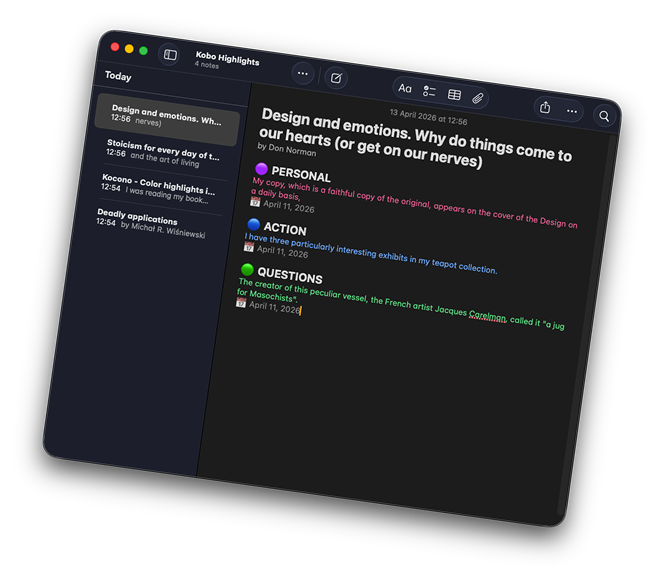
Yes! The highlights will appear in their original colors (yellow, pink, blue, green). Each color section also has an emoji header (🟡🟣🔵🟢) for easy identification.
This tool works with Kobo Clara Colour and Kobo Libra Colour - the devices that support color highlighting. Older Kobo models without color support are not compatible.
Currently, the color mapping is fixed (Yellow=Knowledge, Purple=Personal, Blue=Action, Green=Questions). Custom categories will be added in a future update.
Open Source
Free and transparent. Code is on GitHub. Verify how it works, suggest improvements, or build your own version.

Let's stay in touch!
Get notified when new features launch (mobile support, new export formats)
No spam. Unsubscribe anytime. Updates only when something ships.